Business • 1P
Nightclub Popularity Safe
The business card separates entry cost, production or stock preparation, the owner's sale payout and every helper's actual reward.
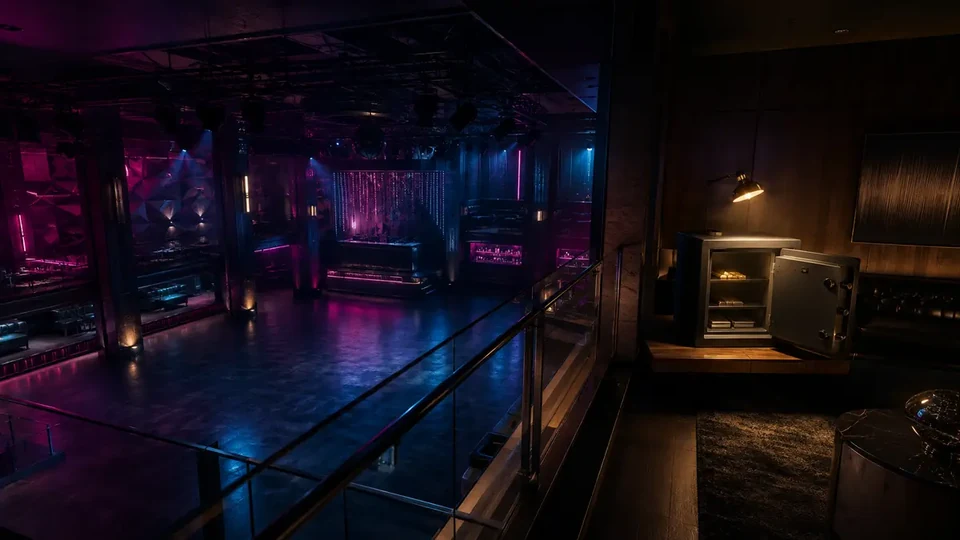 NIGHTCLUB / SAFE
01
Complete financial model
48 minIncome accrues every 48 min; this is not the duration of a separate mission.
the sale goes to the owner and every helper receives an extra bonus; it is not deducted from the owner
02
Nightclub Safe: from Tony to the first popularity deposit
BUSINESS STEP BY STEP • COMPLETE WALKTHROUGH
A complete Nightclub passive-safe path: purchase and setup, the correct accrual driver, first deposit, physical collection and full/empty-safe recovery.
Start here
The exact location, required unlock and checks when the correct panel or marker does not appear.
Visit Tony Prince's T icon, then buy a Nightclub through Maze Bank Foreclosures and enter the new property's office.
The owned Nightclub icon leads to three setups: Staff, Equipment and collecting Solomun from LSIA. Complete all three before the club operates normally.
The upstairs office computer opens Nightclub Management and shows Popularity, clientele, daily income and safe capacity. Once active, inspect the safe's driver, and for collection go exactly to: the hidden wall safe opposite the desk in the Nightclub's upstairs office.
- Buying Nightclub alone does not guarantee maximum income; complete its setup first.
- The technician warehouse, feeder businesses, Sell Goods and Terrorbyte are a separate operation under the Club Do not count that function as part of passive safe income.
- If the safe is empty, check current club popularity, active online time and capacity before buying an optional add-on.
From zero to the first payout
Visit Tony Prince's T icon, then buy a Nightclub through Maze Bank Foreclosures and enter the new property's office. Then complete setup, activate current club popularity, remain online for the first deposit and collect it from the correct safe.
- 011. Buy NightclubVisit Tony Prince's T icon, then buy a Nightclub through Maze Bank Foreclosures and enter the new property's office.
- 022. Complete property setupActivate the legal club front by collecting staff, equipment and the first resident DJ.
- 033. Activate the accrual driverCheck the Popularity bar in Nightclub Management and complete Promote Club or the current management task until the bar rises.
- 044. Play until the first depositIncome accrues passively while playing, not as another screen from the same mission.
- 055. Collect contentsthe hidden wall safe opposite the desk in the Nightclub's upstairs office
Nightclub: setup and first deposit
Each variant below has its own goal, actions, completion condition and recovery; they are not interchangeable generic notes.
01 Nightclub Setup — Staff, Equipment, Solomun
Goal Activate the legal club front by collecting staff, equipment and the first resident DJ.
Key actions - From the computer complete Staff: take the bus and return recruited staff to the Nightclub.
- Complete Equipment: collect gear from the Festival Bus and deliver it to the venue.
- After both setups, collect Solomun at LSIA and safely deliver him to the operating Club.
Completion point Solomun begins his residency, full Nightclub Management opens and popularity becomes active.
What it unlocks next An active Nightclub interior, management and safe accrual.
How to recover the run If Solomun does not appear, verify Staff and Equipment separately. After losing a setup vehicle, relaunch the missing task from the computer; do not sell Warehouse Goods.
02 Nightclub Safe — first accrual
Goal Activate current club popularity and collect the first passive deposit without mixing it with another property function.
Key actions - Check the Popularity bar in Nightclub Management and complete Promote Club or the current management task until the bar rises.
- Remain active in GTA Online until a later, separate deposit.
- Return to the hidden wall safe opposite the desk in the Nightclub's upstairs office and use the collection interaction.
Completion point Cash leaves the safe and enters the owner's balance without launching a sale or finale.
What it unlocks next The repeatable driver-maintenance, accrual and collection loop.
How to recover the run If popularity did not rise, finish the full promotion objective and return to Freemode. If the safe is stalled, empty capacity and raise the decayed bar instead of assigning a technician.
Requirements, purchase and functional unlock
Nightclub is the required purchase. The Staff Upgrade slows popularity loss and other DJs offer another upkeep route; Warehouse Technicians, warehouse Equipment Upgrade and Terrorbyte are not required for the safe is not a condition for the first deposit.
Nightclub
Status
Visit Tony Prince's T icon, then buy a Nightclub through Maze Bank Foreclosures and enter the new property's office.
- Buy the correct property type from the stated website.
- Visit and complete its scene/setup instead of looking for the safe immediately.
Functional activation
Status
current club popularity
- Check the Popularity bar in Nightclub Management and complete Promote Club or the current management task until the bar rises.
- Check state on the correct terminal rather than another operation's panel.
Separate functions and upgrades
Status
The Staff Upgrade slows popularity loss and other DJs offer another upkeep route; Warehouse Technicians, warehouse Equipment Upgrade and Terrorbyte are not required for the safe
- Buy later only for their stated effect.
- Do not use them as empty-safe recovery.
First complete run
Complete setup, Check the Popularity bar in Nightclub Management and complete Promote Club or the current management task until the bar rises., wait for a separate accrual and collect at: the hidden wall safe opposite the desk in the Nightclub's upstairs office.
01 Activate the correct state
ActionCheck the Popularity bar in Nightclub Management and complete Promote Club or the current management task until the bar rises.
How to verifyThe computer shows higher Popularity and projected daily income; Warehouse Goods on another panel are not this driver.
How to recover the runIf popularity did not rise, finish the full promotion objective and return to Freemode. If the safe is stalled, empty capacity and raise the decayed bar instead of assigning a technician.
02 Wait for separate accrual
ActionRemain online and run other work; do not idle beside the safe.
How to verifyCash appears in the safe without a sale, contract or finale screen.
How to recover the runIf no deposit appears, verify driver state, setup and whether capacity is already reached.
03 Empty the correct safe
ActionApproach the hidden wall safe opposite the desk in the Nightclub's upstairs office and confirm collection.
How to verifySafe contents fall, owner balance rises and room opens for later deposits.
How to recover the runClose active menus/jobs, exit the property and re-enter if the collection panel does not respond.
How the Nightclub safe works
This section explains the function's own mechanic without mixing it with other services in the same property.
Raise popularity through Promote Club/Club Management, in-club management events or changing the resident DJ; the Staff Upgrade only slows decay and does not replace upkeep.
Income enters the owner's safe; capacity is $250,000.
The rate follows discrete steps; it is not a simple linear multiplier.
A large step occurs at 85%, and lower bands have their own values.
Once full, empty the safe so later intervals can be stored.
Raise the accrual driver or empty the safe
Raise / maintain the driver
Active property actionRaise popularity through Promote Club/Club Management, in-club management events or changing the resident DJ; the Staff Upgrade only slows decay and does not replace upkeep.
Collect on a routine visit
$0 collection feeCombine state inspection and safe collection in one visit.
BASELINE, NOT AN EVENTRockstar does not publish the full numeric table; the values below are supported by aligned current secondary/community sources (confidence B).
Solo and crew
The Nightclub safe is an owner function. Crew may help with active work that raises its state, but cannot collect or split passive income.
OWNER — manages and collects
Only the owner changes property state and transfers cash from their safe.
CONCRETE ROLES
- Checks the accrual driver on the correct terminal.
- Empties the safe before capacity and keeps income separate from other activities.
CREW — active support only
Helpers may support setup or driver-maintenance work but cannot collect the safe.
CONCRETE ROLES
- Helps with transport or combat during active work.
- After completion, the owner checks deposit and capacity alone.
First deposit and physical collection
Follow these steps in order and verify settlement before starting another activity.
- Buy and set up Nightclub.
- Check the Popularity bar in Nightclub Management and complete Promote Club or the current management task until the bar rises.
- Remain online and keep free safe capacity.
- Check the Popularity bar in Nightclub Management and complete Promote Club or the current management task until the bar rises.
- Play online until a separate deposit.
- Return to the hidden wall safe opposite the desk in the Nightclub's upstairs office and collect contents.
the hidden wall safe opposite the desk in the Nightclub's upstairs office
Owner and helpers
Property owner
ROLE
Controls the correct driver and collects all contents of their safe.
LIMIT
Full capacity stops storage of later deposits.
Helper in active work
ROLE
Can shorten setup or a state-raising job.
LIMIT
Has no access to the owner's passive safe or share of its deposit.
The correct passive loop
Maintain → accrue → collect
How to recognise it
The panel shows current club popularity, while cash appears separately in the safe.
Action
Maintain the correct state, run other online activities and return to collect.
Tip
Combine driver inspection and collection in one visit to avoid losing intervals at capacity.
Risk / failure condition
The technician warehouse, feeder businesses, Sell Goods and Terrorbyte are a separate operation under the Club or a full safe do not raise the current deposit.
How to recover the run
If popularity did not rise, finish the full promotion objective and return to Freemode. If the safe is stalled, empty capacity and raise the decayed bar instead of assigning a technician.
Interacting with the physical safe transfers accrued cash to the owner. It launches no sale and settles no separate property operation.
What to do next
Raise popularity through Promote Club/Club Management, in-club management events or changing the resident DJ; the Staff Upgrade only slows decay and does not replace upkeep. Combine that work with regular collection so capacity does not stop later deposits.
- 01
Inspect the correct driver
Raise popularity through Promote Club/Club Management, in-club management events or changing the resident DJ; the Staff Upgrade only slows decay and does not replace upkeep.
- 02
Work during accrual
Run another online activity instead of waiting by the safe.
- 03
Collect before capacity
Regular collection leaves room for later deposits.
Common mistakes and fixes
Mixing property functions
FixThe technician warehouse, feeder businesses, Sell Goods and Terrorbyte are a separate operation under the Club
Treating ownership as full rate
FixRaise popularity through Promote Club/Club Management, in-club management events or changing the resident DJ; the Staff Upgrade only slows decay and does not replace upkeep.
Ignoring a full safe
FixEmpty it physically; continued play does not automatically transfer overflow.
Checklist: have / done / ready to earn
HAVE
Nightclub
Completed property setup
Access to the correct terminal and safe
DONE
Check the Popularity bar in Nightclub Management and complete Promote Club or the current management task until the bar rises.
Remained online for a deposit
READY TO COLLECT
I see cash in the safe
I separate it from other operations
Common blockers and recovery
Repair the missing unlock or session state first. Do not repurchase the property or launch a different function as a workaround.
The safe stays empty
Check in order
- Verify setup completion.
- The computer shows higher Popularity and projected daily income; Warehouse Goods on another panel are not this driver.
- Check active online play time.
Deposits stopped
Check in order
- Check safe capacity.
- Check state: current club popularity.
- Check whether the character remains online.
I am using the wrong panel
Check in order
- The technician warehouse, feeder businesses, Sell Goods and Terrorbyte are a separate operation under the Club
- The upstairs office computer opens Nightclub Management and shows Popularity, clientele, daily income and safe capacity.
- the hidden wall safe opposite the desk in the Nightclub's upstairs office
03
Expanded informational overview
Guide scopeThis section organizes the complete cycle: requirements, phases, figures and dependencies. The detailed operation flow is in the walkthrough above.
Time and hourly results include stock or income accrual. The final delivery is only one part of the complete cycle.
04
How the full cycle works
This section complements the walkthrough with full-cycle dependencies: unlock, preparations, finale, settlement and the next available attempt.
Purchase and unlock
The base requirement is Nightclub; the minimum entry cost is shown in the financial panel.
Setup
The business must be configured and remain active. Upgrades should be evaluated separately from the property price.
Production / accrual
The full time model uses 48 min as the typical cycle.
Sale or collection
The panel separates owner proceeds, costs, commissions and extra helper rewards.
Next cycle
Income accrues every 48 min; this is not the duration of a separate mission.
05
What affects the result
The range shows small, typical and full variants where value is variable.
Supply costs and agent fees are deducted before the owner's result.
Owner proceeds plus a separate reward for each helper. The sale value is not split equally.
The comparison uses 48 min / 48 min / 48 min for the complete cycle.
Main strengths
- Can combine active sales with passive value accrual.
- Helpers do not automatically reduce the owner's proceeds.
Constraints
- Purchase payback depends on regular use.
- A helper's reward can be far lower than the owner's proceeds and is shown separately.
06
Solo / Duo / Trio / Quatro variants
Every supported team size shows its host, partner and team model. Provisional rates are clearly labelled, and incomplete data is explained alongside the result.
Solo: full pace control and no crew wait.
- Host / owner
- $25,000
- Team net
- $25,000
- Accrual interval
- 48 min
07
Complete figures by team
Typical values for the selected cycle; every cell also contains a min–max range.
| Team | Cooldown | Team gross | Costs + fees | Host / owner | Each partner | Team net | Host / owner $/h | Team $/h |
|---|---|---|---|---|---|---|---|---|
| SOLO | 48 minAccrual interval | $25,000min: $1,500 · typical: $25,000 · max: $50,000 | $0min: $0 · typical: $0 · max: $0 | $25,000min: $1,500 · typical: $25,000 · max: $50,000 | — | $25,000min: $1,500 · typical: $25,000 · max: $50,000 | $31,250min: $1,875 · typical: $31,250 · max: $62,500 | $31,250min: $1,875 · typical: $31,250 · max: $62,500 |
08
Key facts
VIDEO
Video walkthrough
Verified video · EN
Nightclub Safe Complete Guide | BEST Passive Money Method (GTA 5 Online)
Popularity, income cycle and safe.
- Channel
- Red Nitrate
- Published
- 9 Sept 2022
- Checked
- 29 Aug 2026